Managing Users and Groups in a Multi-tenant Application
Description
The UX component Admin_MaintainUsersAndGroups can be installed when you set up the Security Framework with the Security Genie. This component is key to multi-tenant mode. This lets a manager in one tenant (organization) add/edit users and groups only for that tenant.
How this relates to data multi-tenancy
This page describes tenant scoping for the administrative UX componentAdmin_MaintainUsersAndGroups (what users a manager can see/edit). If you also need to isolate application data by tenant (e.g., separate databases or schemas), see Creating a Multi-tenant Connection.
Overview
In multi-tenant mode, the UX component Admin_MaintainUsersAndGroups provides:
- Tenant scoping
All user/group lists and edits are filtered by the current tenant.
- Role-aware actions
Administrative actions are limited to permitted roles within the tenant.
- Compatible with existing projects
Works with projects created using the Security Genie.
How to create a multi-tenant admin UX in Alpha Anywhere (from the video)
In the Web Projects Control Panel, create a New Project
Enable the Security Framework during project creation.
The Web Security Framework - Quick Setup Genie will open.
Choose to create a Superadministrator role./description
Create Extended User Information Table. This is required for multi-tenant mode because the user’s TenantID is stored in the extended user info table. Note: If you do not create the Extended User-Information table now, you can create it at a later stage by opening the Project Properties dialog from the Web Control Panel.
Connection String: Click the ".." button to choose an existing connection string or data source.
Click "Yes - Enable the Web Security Framework"
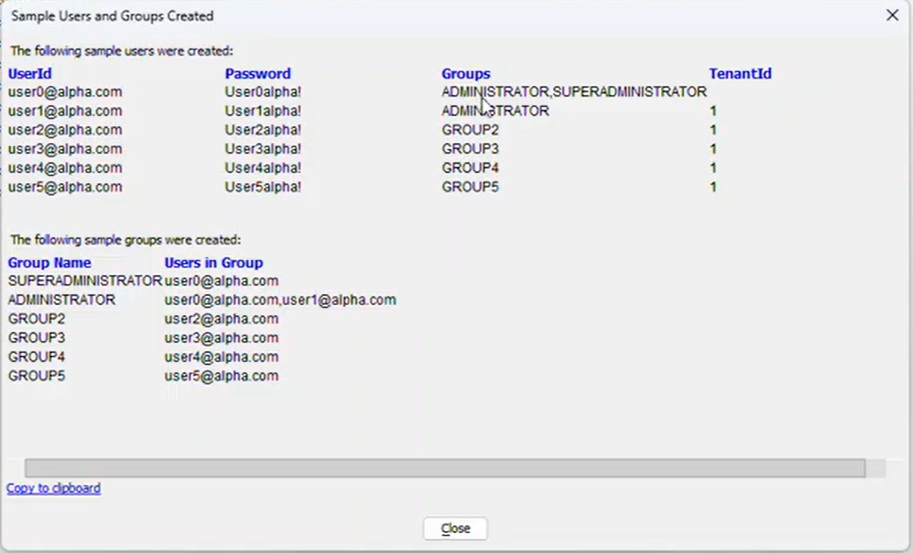
This will install the sample admin UX. A new dialog will open "Sample Users and Groups Created"
The Admin_MaintainUsersAndGroups component is installed for managing users and groups and now shows under web components. If you double-click, you can edit the individual controls of this component, if you like.
Go to Code: Xbasic functions. You can see that the Multi-tenant mode flag is set to true/turned on (pMulti.flagMultiTenantMode=.t.). You can disable multi-tenant behavior by setting this flag to false.
What the Superadministrator vs Admin can do
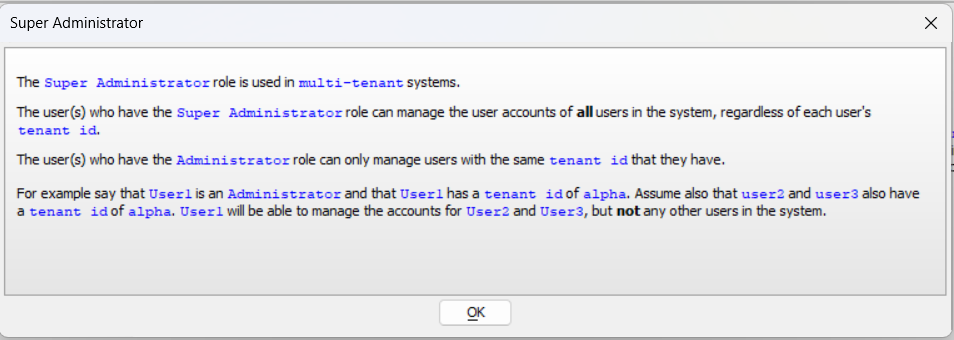
When logged into your app as a Superadministrator (e.g., user 0), the Admin_MaintainUsersAndGrops UX shows users across all tenants. Opening a user record shows both group assignments and the user role.
The Superadministrator can set a user’s TenantID in the extended user info. However, the Superadministrator will not, themselves, have a TenantID
A regular Admin (e.g., user1 in TenantID1) can change group membership for users in their own tenant, but cannot assign the Superadministrator role and cannot change a user’s TenantID.
Admins only see users in their own tenant; they will not see the Superadministrator account.
Video (added 2024-01-19)
See Also